Motor
Repository source: Motor
Description
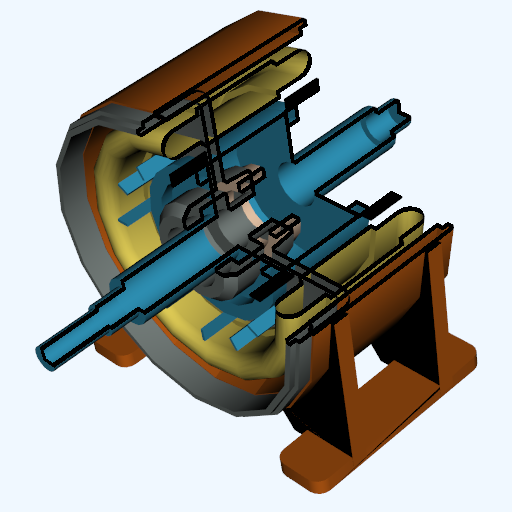
This is an example of texture clipping using a transparent texture map. The motor shown consists of five complex parts, some of which are hidden by the outer casing. To see the inside of the motor, we define an implicit clipping function. This function is simply the intersection of two planes to form a clipping "corner". The object vtkImplicitTextureCoords is used in combination with this implicit function to generate texture coordinates. These objects are then rendered with the appropriate texture map and the internal parts of the motor can be seen.
The texture map consists of three regions (as described previously in the chapter). The concealed region is transparent. The transition region is opaque but with a black (zero intensity) color. The highlighted region is full intensity and opaque. As can be seen from the result , the boundaries appear as black borders giving a nice visual effect.
Info
See Figure 9-53 in Chapter 9 The VTK Textbook.
Other languages
See (Python), (PythonicAPI)
Question
If you have a question about this example, please use the VTK Discourse Forum
Code
Motor.cxx
/*
This code is based on the VTK file: /IO/Geometry/Testing/Python/motor.py.
*/

#include <vtkActor.h>
#include <vtkBYUReader.h>
#include <vtkCamera.h>
#include <vtkDataSetMapper.h>
#include <vtkFloatArray.h>
#include <vtkImplicitTextureCoords.h>
#include <vtkInteractorStyleSwitch.h>
#include <vtkNamedColors.h>
#include <vtkNew.h>
#include <vtkPlanes.h>
#include <vtkPoints.h>
#include <vtkPolyDataNormals.h>
#include <vtkProperty.h>
#include <vtkRenderWindow.h>
#include <vtkRenderWindowInteractor.h>
#include <vtkRenderer.h>
#include <vtkStringFormatter.h>
#include <vtkStructuredPointsReader.h>
#include <vtkTexture.h>

#include <vtk_cli11.h>
// #include <vtk_fmt.h>
// // clang-format off
// #include VTK_FMT(fmt/format.h)
// // clang-format on

namespace fs = std::filesystem;

int main(int argc, char* argv[])
{
  CLI::App app{"Streamtubes created by using the computational grid"
               " just in front of the post as a source for seeds."};

  // Define options.
  std::string textureFile;
  app.add_option("textureFile", textureFile,
                 "The path to the data file e.g. texThres2.vtk.")
      ->required()
      ->check(CLI::ExistingFile);
  std::string motorFile;
  app.add_option("motorFile", motorFile,
                 "The path to the velocity vtu file, e.g. motor.g.")
      ->required()
      ->check(CLI::ExistingFile);

  CLI11_PARSE(app, argc, argv);

  vtkNew<vtkNamedColors> colors;

  // Create the Renderer, RenderWindow and RenderWindowInteractor.
  vtkNew<vtkRenderer> ren;
  ren->SetBackground(colors->GetColor3d("SlateGray").GetData());
  vtkNew<vtkRenderWindow> renWin;
  renWin->AddRenderer(ren);
  renWin->SetSize(512, 512);
  auto appFn = fs::path((app.get_name())).stem().string();
  renWin->SetWindowName(appFn.c_str());

  vtkNew<vtkRenderWindowInteractor> iren;
  iren->SetRenderWindow(renWin);

  auto is = vtkInteractorStyleSwitch::SafeDownCast(iren->GetInteractorStyle());
  if (is)
  {
    is->SetCurrentStyleToTrackballCamera();
  }

  // Create the cutting planes.
  vtkNew<vtkPlanes> planes;
  vtkNew<vtkPoints> points;
  vtkNew<vtkFloatArray> norms;

  norms->SetNumberOfComponents(3);
  points->InsertPoint(0, 0.0, 0.0, 0.0);
  norms->InsertTuple3(0, 0.0, 0.0, 1.0);
  points->InsertPoint(1, 0.0, 0.0, 0.0);
  norms->InsertTuple3(1, -1.0, 0.0, 0.0);
  planes->SetPoints(points);
  planes->SetNormals(norms);

  // Get the texture.
  vtkNew<vtkStructuredPointsReader> texReader;
  texReader->SetFileName(textureFile.c_str());
  vtkNew<vtkTexture> texture;
  texture->SetInputConnection(texReader->GetOutputPort());
  texture->InterpolateOff();
  texture->RepeatOff();

  // Set up the pipelines for the parts of the motor.
  // We will use lists of pipeline objects.
  auto numberOfParts = 5;
  std::vector<std::string> partColours{"cold_grey", "peacock", "raw_sienna",
                                       "banana", "peach_puff"};
  // Use this to control which parts to display.
  std::vector<bool> displayParts(numberOfParts, true);
  // If displayParts[2] = false; then an image like that in the VTK tests is
  // produced.

  for (auto i = 0; i < numberOfParts; ++i)
  {
    vtkNew<vtkBYUReader> byu;
    byu->SetGeometryFileName(motorFile.c_str());
    byu->SetPartNumber(i + 1);

    vtkNew<vtkPolyDataNormals> normals;
    normals->SetInputConnection(byu->GetOutputPort());

    vtkNew<vtkImplicitTextureCoords> tex;
    tex->SetInputConnection(normals->GetOutputPort());
    tex->SetRFunction(planes);
    // tex->FlipTextureOn();

    vtkNew<vtkDataSetMapper> byuMapper;
    byuMapper->SetInputConnection(tex->GetOutputPort());

    vtkNew<vtkActor> byuActor;
    byuActor->SetMapper(byuMapper);
    byuActor->SetTexture(texture);
    byuActor->GetProperty()->SetColor(
        colors->GetColor3d(partColours[i]).GetData());

    if (displayParts[i])
    {
      byuActor->VisibilityOn();
    }
    else
    {
      byuActor->VisibilityOff();
    }

    ren->AddActor(byuActor);
  }

  vtkNew<vtkCamera> camera;
  camera->SetFocalPoint(0.0286334, 0.0362996, 0.0379685);
  camera->SetPosition(1.37067, 1.08629, -1.30349);
  camera->SetViewAngle(17.673);
  camera->SetClippingRange(1, 10);
  camera->SetViewUp(-0.376306, -0.5085, -0.774482);
  ren->SetActiveCamera(camera);

  // Render the image.
  renWin->Render();
  iren->Initialize();
  iren->Start();

  return EXIT_SUCCESS;
}
CMakeLists.txt
cmake_minimum_required(VERSION 3.12 FATAL_ERROR)

project(Motor)

find_package(VTK COMPONENTS
  CommonColor
  CommonCore
  CommonDataModel
  FiltersCore
  FiltersTexture
  IOGeometry
  IOLegacy
  InteractionStyle
  RenderingContextOpenGL2
  RenderingCore
  RenderingFreeType
  RenderingGL2PSOpenGL2
  RenderingOpenGL2
)

if (NOT VTK_FOUND)
  message(FATAL_ERROR "Motor: Unable to find the VTK build folder.")
endif()

# Prevent a "command line is too long" failure in Windows.
set(CMAKE_NINJA_FORCE_RESPONSE_FILE "ON" CACHE BOOL "Force Ninja to use response files.")
add_executable(Motor MACOSX_BUNDLE Motor.cxx )
  target_link_libraries(Motor PRIVATE ${VTK_LIBRARIES}
)
# vtk_module_autoinit is needed
vtk_module_autoinit(
  TARGETS Motor
  MODULES ${VTK_LIBRARIES}
)
Download and Build Motor
Click here to download Motor and its CMakeLists.txt file. Once the tarball Motor.tar has been downloaded and extracted,
cd Motor/build
If VTK is installed:
cmake ..
If VTK is not installed but compiled on your system, you will need to specify the path to your VTK build:
cmake -DVTK_DIR:PATH=/home/me/vtk_build ..
Build the project:
make
and run it:
./Motor
WINDOWS USERS
Be sure to add the VTK bin directory to your path. This will resolve the VTK dll's at run time.