HeadBone
Repository source: HeadBone
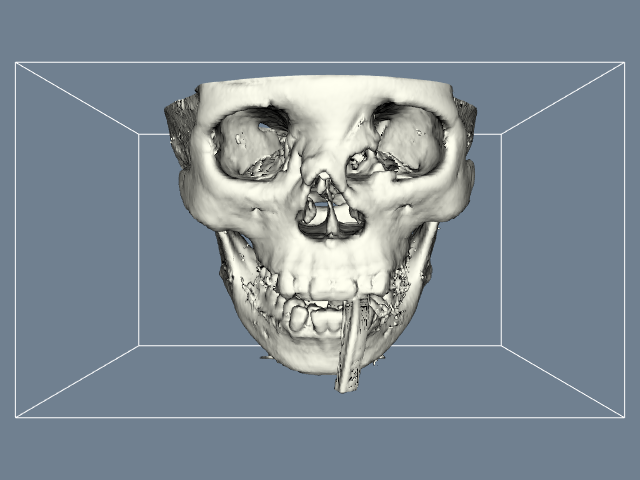
Description
This example generates an isosurface of human bone.
Info
See Figure 6-11b in Chapter 6 the VTK Textbook.
Other languages
See (Python), (PythonicAPI)
Question
If you have a question about this example, please use the VTK Discourse Forum
Code
HeadBone.cxx
#include <vtkActor.h>
#include <vtkCamera.h>
#include <vtkFlyingEdges3D.h>
#include <vtkMarchingCubes.h>
#include <vtkMergePoints.h>
#include <vtkMetaImageReader.h>
#include <vtkNamedColors.h>
#include <vtkNew.h>
#include <vtkOutlineFilter.h>
#include <vtkPolyDataMapper.h>
#include <vtkProperty.h>
#include <vtkRenderWindow.h>
#include <vtkRenderWindowInteractor.h>
#include <vtkRenderer.h>
#include <vtkVersion.h>

#include <vtk_cli11.h>
#include <vtk_fmt.h>
// clang-format off
#include VTK_FMT(fmt/format.h)
// clang-format on

namespace fs = std::filesystem;

int main(int argc, char* argv[])
{
  CLI::App app{"Flying Edges or Marching Cubes surface of human bone."};

  // Define options
  std::string fileName;
  app.add_option("fileName", fileName,
                 "The path to the data file e.g. FullHead.mhd.")
      ->required()
      ->check(CLI::ExistingFile);

  bool flyingEdges = true;
  app.add_flag("-m{false},!-n", flyingEdges,
               "Use flying edges by default, marching cubes if set.");

  CLI11_PARSE(app, argc, argv);

  if (flyingEdges)
  {
#define USE_FLYING_EDGES
  }

  // Create the RenderWindow, Renderer and both Actors.
  //
  vtkNew<vtkNamedColors> colors;

  vtkNew<vtkRenderer> ren1;

  vtkNew<vtkRenderWindow> renWin;
  auto appFn = fs::path((app.get_name())).stem().string();
  renWin->SetSize(640, 480);
  renWin->SetWindowName(appFn.c_str());
  renWin->AddRenderer(ren1);

  vtkNew<vtkRenderWindowInteractor> iren;
  iren->SetRenderWindow(renWin);

  // Create pipeline.
  //

  vtkNew<vtkMetaImageReader> reader;
  reader->SetFileName(fileName.c_str());
  reader->Update();

  vtkNew<vtkMergePoints> locator;
  locator->SetDivisions(64, 64, 92);
  locator->SetNumberOfPointsPerBucket(2);
  locator->AutomaticOff();

#ifdef USE_FLYING_EDGES
  vtkNew<vtkFlyingEdges3D> iso;
#else
  vtkNew<vtkMarchingCubes> iso;
#endif
  iso->SetInputConnection(reader->GetOutputPort());
  iso->ComputeGradientsOn();
  iso->ComputeScalarsOff();
  iso->SetValue(0, 1150);
#ifndef USE_FLYING_EDGES
  iso->SetLocator(locator);
#endif

  vtkNew<vtkPolyDataMapper> isoMapper;
  isoMapper->SetInputConnection(iso->GetOutputPort());
  isoMapper->ScalarVisibilityOff();

  vtkNew<vtkActor> isoActor;
  isoActor->SetMapper(isoMapper);
  isoActor->GetProperty()->SetColor(colors->GetColor3d("Ivory").GetData());

  vtkNew<vtkOutlineFilter> outline;
  outline->SetInputConnection(reader->GetOutputPort());

  vtkNew<vtkPolyDataMapper> outlineMapper;
  outlineMapper->SetInputConnection(outline->GetOutputPort());

  vtkNew<vtkActor> outlineActor;
  outlineActor->SetMapper(outlineMapper);

  // Add the actors to the renderer, set the background and size.
  //
  ren1->AddActor(outlineActor);
  ren1->AddActor(isoActor);
  ren1->SetBackground(colors->GetColor3d("SlateGray").GetData());
  ren1->GetActiveCamera()->SetFocalPoint(0, 0, 0);
  ren1->GetActiveCamera()->SetPosition(0, -1, 0);
  ren1->GetActiveCamera()->SetViewUp(0, 0, 1);
  ren1->ResetCamera();
  ren1->GetActiveCamera()->Dolly(1.5);
  ren1->ResetCameraClippingRange();

  renWin->Render();
  iren->Start();
  return EXIT_SUCCESS;
}
CMakeLists.txt
cmake_minimum_required(VERSION 3.12 FATAL_ERROR)

project(HeadBone)

find_package(VTK COMPONENTS
  CommonColor
  CommonCore
  CommonDataModel
  FiltersCore
  FiltersModeling
  IOImage
  InteractionStyle
  RenderingContextOpenGL2
  RenderingCore
  RenderingFreeType
  RenderingGL2PSOpenGL2
  RenderingOpenGL2
)

if (NOT VTK_FOUND)
  message(FATAL_ERROR "HeadBone: Unable to find the VTK build folder.")
endif()

# Prevent a "command line is too long" failure in Windows.
set(CMAKE_NINJA_FORCE_RESPONSE_FILE "ON" CACHE BOOL "Force Ninja to use response files.")
add_executable(HeadBone MACOSX_BUNDLE HeadBone.cxx )
  target_link_libraries(HeadBone PRIVATE ${VTK_LIBRARIES}
)
# vtk_module_autoinit is needed
vtk_module_autoinit(
  TARGETS HeadBone
  MODULES ${VTK_LIBRARIES}
)
Download and Build HeadBone
Click here to download HeadBone and its CMakeLists.txt file. Once the tarball HeadBone.tar has been downloaded and extracted,
cd HeadBone/build
If VTK is installed:
cmake ..
If VTK is not installed but compiled on your system, you will need to specify the path to your VTK build:
cmake -DVTK_DIR:PATH=/home/me/vtk_build ..
Build the project:
make
and run it:
./HeadBone
WINDOWS USERS
Be sure to add the VTK bin directory to your path. This will resolve the VTK dll's at run time.