TissueLens
Repository source: TissueLens
Description
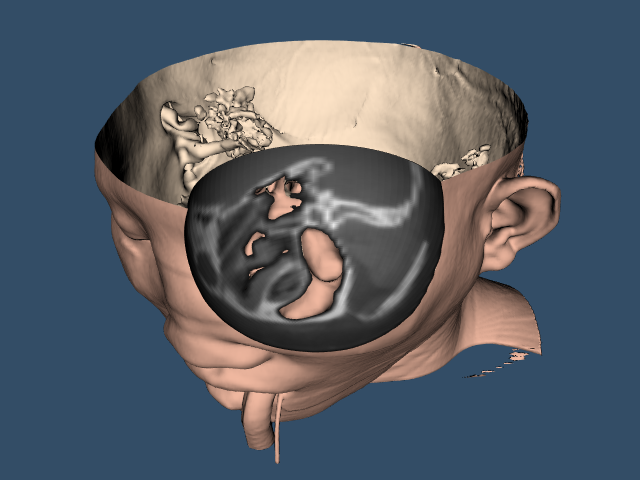
Here a "magnifying lens" or "window" effect is generated, allowing users to peek inside a 3D medical dataset—such as a human head CT or MRI scan—by cutting a clean hole into the outer layer (the skin) to reveal the underlying structures (like the brain or bone) inside a specific region.
This example uses two vtkClipDataSet filters to achieve a "tissue lens" effect. First, a vtkSphere implicit function is used to clip a spherical hole in the isosurface extracted with vtkFlyingEdges3D or vtkMarchingCubes. Then a geometric vtkSphereSource samples the original volume data using a vtkProbeFilter. vtkClipDataSet uses the resulting scalar point data to clip the sphere surface with the isosurface value.
Usage
TissueLens FullHead.mhd
Note
The skin color was selected from Table 7 in Improvement of Haar Feature Based Face Detection in OpenCV Incorporating Human Skin Color Characteristic
Info
The example uses src/Testing/Data/FullHead.mhd which references src/Testing/Data/FullHead.raw.gz.
Other languages
See (Python), (PythonicAPI)
Question
If you have a question about this example, please use the VTK Discourse Forum
Code
TissueLens.cxx
#include <vtkActor.h>
#include <vtkCamera.h>
#include <vtkCameraOrientationRepresentation.h>
#include <vtkCameraOrientationWidget.h>
#include <vtkClipDataSet.h>
#include <vtkDataSetMapper.h>
#include <vtkFlyingEdges3D.h>
#include <vtkInteractorStyleSwitch.h>
#include <vtkLookupTable.h>
#include <vtkMarchingCubes.h>
#include <vtkMetaImageReader.h>
#include <vtkNamedColors.h>
#include <vtkNew.h>
#include <vtkPolyDataMapper.h>
#include <vtkProbeFilter.h>
#include <vtkProperty.h>
#include <vtkRenderWindow.h>
#include <vtkRenderWindowInteractor.h>
#include <vtkRenderer.h>
#include <vtkSphere.h>
#include <vtkSphereSource.h>
#include <vtkUnstructuredGrid.h>

#include <vtk_cli11.h>
#include <vtk_fmt.h>
// clang-format off
#include VTK_FMT(fmt/format.h)
// clang-format on

#include <array>
#include <filesystem>

namespace fs = std::filesystem;

namespace {

typedef std::map<std::string, std::string> TAxisParams;
typedef std::map<std::string, TAxisParams> TAxesParams;

/**
 * @brief Define the axes labels.
 *
 * @return The axes labels.
 */
TAxesParams DefineAxesLabels();

/**
 * @brief Define the axes colors.
 *
 * @return The axes colors.
 */
TAxesParams DefineAxesColors();

/**
 * @brief Gather the defined axes labels and colors into a map.
 *
 * @return The map of axes labels and colors.
 */
std::map<std::string, std::pair<TAxisParams, TAxisParams>> GetAxesParams();

/**
 * @brief Make a camera orientation widget for a given renderer.
 *
 * position has these values 0: LowerLeft, 1: UpperLeft, 2: LowerRight, 3:
 * UpperRight
 *
 * @param ren The renderer.
 * @param alc The key specifying the desired labels and colors for the axes.
 * @param colors A reference to the vtkNamedColors object.
 * @param position Move the camera orientation widget to upper left.
 *
 * @return The camera orientation widget.
 */
vtkNew<vtkCameraOrientationWidget>
MakeCameraOrientationWidget(vtkRenderer* ren, std::string alcKey = "xyz",
                            int const& position = 3);
} // namespace

int main(int argc, char* argv[])
{
  CLI::App app{"Generate a \"magnifying lens\" or \"window\" effect,"
               " allowing users to peek inside a 3D medical dataset."};

  // Define options
  std::string fileName;
  app.add_option("fileName", fileName,
                 "The path to the data file e.g. FullHead.mhd.")
      ->required()
      ->check(CLI::ExistingFile);

  bool flyingEdges = true;
  app.add_flag("-m{false},!-n", flyingEdges,
               "Use flying edges by default, marching cubes if set.");

  CLI11_PARSE(app, argc, argv);

  vtkNew<vtkNamedColors> colors;

  std::array<unsigned char, 4> skinColor{{240, 184, 160, 255}};
  colors->SetColor("SkinColor", skinColor.data());
  std::array<unsigned char, 4> backColor{{255, 229, 200, 255}};
  colors->SetColor("BackfaceColor", backColor.data());
  std::array<unsigned char, 4> bkg{{51, 77, 102, 255}};
  colors->SetColor("BkgColor", bkg.data());

  // Create the renderer, the render window, and the interactor. The
  // renderer draws into the render window, the interactor enables
  // mouse- and keyboard-based interaction with the data within the
  // render window.
  //
  vtkNew<vtkRenderer> ren;
  vtkNew<vtkRenderWindow> renWin;
  // Set a background color for the renderer and set the size of the
  // render window (expressed in pixels).
  ren->SetBackground(colors->GetColor3d("BkgColor").GetData());
  renWin->SetSize(640, 480);
  auto appFn = fs::path((app.get_name())).stem().string();
  renWin->SetWindowName(appFn.c_str());
  renWin->AddRenderer(ren);

  vtkNew<vtkRenderWindowInteractor> iren;
  iren->SetRenderWindow(renWin);
  auto is = vtkInteractorStyleSwitch::SafeDownCast(iren->GetInteractorStyle());
  if (is)
  {
    is->SetCurrentStyleToTrackballCamera();
  }

  // Read the volume data.
  vtkNew<vtkMetaImageReader> reader;
  reader->SetFileName(argv[1]);
  reader->Update();

  // An isosurface, or contour value of 500 is known to correspond to the
  // skin of the patient.
#ifdef USE_FLYING_EDGES
  vtkNew<vtkFlyingEdges3D> skinExtractor;
#else
  vtkNew<vtkMarchingCubes> skinExtractor;
#endif
  skinExtractor->SetInputConnection(reader->GetOutputPort());
  skinExtractor->SetValue(0, 500);

  std::array<double, 3> clipCenter{-70, 60, -10};

  // Define a spherical clip function to clip the isosurface.
  vtkNew<vtkSphere> clipFunction;
  clipFunction->SetRadius(50);
  clipFunction->SetCenter(clipCenter.data());

  // Clip the isosurface with a sphere.
  vtkNew<vtkClipDataSet> skinClip;
  skinClip->SetInputConnection(skinExtractor->GetOutputPort());
  skinClip->SetClipFunction(clipFunction);
  skinClip->SetValue(0);
  skinClip->GenerateClipScalarsOn();
  skinClip->Update();

  vtkNew<vtkDataSetMapper> skinMapper;
  skinMapper->SetInputConnection(skinClip->GetOutputPort());
  skinMapper->ScalarVisibilityOff();

  vtkNew<vtkProperty> skinProp;
  skinProp->SetDiffuseColor(colors->GetColor3d("SkinColor").GetData());
  vtkNew<vtkProperty> backProp;
  backProp->SetDiffuseColor(colors->GetColor3d("BackfaceColor").GetData());

  vtkNew<vtkActor> skin;
  skin->SetMapper(skinMapper);
  skin->SetProperty(skinProp);
  skin->SetBackfaceProperty(backProp);

  // Define a model for the "lens". Its geometry matches the implicit
  // sphere used to clip the isosurface.
  vtkNew<vtkSphereSource> lensModel;
  lensModel->SetRadius(50);
  lensModel->SetCenter(clipCenter.data());
  lensModel->SetPhiResolution(201);
  lensModel->SetThetaResolution(101);

  // Sample the input volume with the lens model geometry.
  vtkNew<vtkProbeFilter> lensProbe;
  lensProbe->SetInputConnection(lensModel->GetOutputPort());
  lensProbe->SetSourceConnection(reader->GetOutputPort());

  // Clip the lens data with the isosurface value.
  vtkNew<vtkClipDataSet> lensClip;
  lensClip->SetInputConnection(lensProbe->GetOutputPort());
  lensClip->SetValue(500);
  lensClip->GenerateClipScalarsOff();
  lensClip->Update();

  // Define a suitable grayscale lut.
  vtkNew<vtkLookupTable> bwLut;
  bwLut->SetTableRange(0, 2048);
  bwLut->SetSaturationRange(0, 0);
  bwLut->SetHueRange(0, 0);
  bwLut->SetValueRange(0.2, 1);
  bwLut->Build();

  vtkNew<vtkDataSetMapper> lensMapper;
  lensMapper->SetInputConnection(lensClip->GetOutputPort());
  lensMapper->SetScalarRange(lensClip->GetOutput()->GetScalarRange());
  lensMapper->SetLookupTable(bwLut);

  vtkNew<vtkActor> lens;
  lens->SetMapper(lensMapper);

  // It is convenient to create an initial view of the data. The FocalPoint
  // and Position form a vector direction. Later on (ResetCamera() method)
  // this vector is used to position the camera to look at the data in
  // this direction.
  vtkNew<vtkCamera> camera;
  camera->SetViewUp(0, 0, 1);
  camera->SetPosition(0, -1, 0);
  camera->SetFocalPoint(0, 0, 0);
  camera->ComputeViewPlaneNormal();
  camera->Azimuth(30.0);
  camera->Elevation(30.0);

  // Actors are added to the renderer. An initial camera view is created.
  // The Dolly() method moves the camera towards the FocalPoint,
  // thereby enlarging the image.
  ren->AddActor(lens);
  ren->AddActor(skin);
  ren->SetActiveCamera(camera);
  ren->ResetCamera();
  camera->Dolly(1.5);

  // Note that when camera movement occurs (as it does in the Dolly()
  // method), the clipping planes often need adjusting. Clipping planes
  // consist of two planes: near and far along the view direction. The
  // near plane clips out objects in front of the plane; the far plane
  // clips out objects behind the plane. This way only what is drawn
  // between the planes is actually rendered.
  ren->ResetCameraClippingRange();

  // Important: The interactor must be set prior to enabling the widget.
  auto cow = MakeCameraOrientationWidget(ren);
  cow->On();

  auto category = "lrpasi";
  auto cow1 = MakeCameraOrientationWidget(ren, category, 1);
  cow1->On();

  // Initialize the event loop and then start it.
  renWin->Render();
  iren->Initialize();
  iren->Start();

  return EXIT_SUCCESS;
}

namespace {
TAxesParams DefineAxesLabels()
{
  // clang-format off
  return {
          // Labels are: Anterior, Posterior, Dorsal, Ventral, Left, Right
          {"apdvlr", {{"+X", "A"},{"-X", "P"},{"+Y", "D"},{"-Y", "V"},{"+Z", "L"},{"-Z", "R"}}},
          {"apdvrl",{{"+X", "A"},{"-X", "P"},{"+Y", "D"},{"-Y", "V"},{"+Z", "R"},{"-Z", "L"}}},
          {"aprlvd",{{"+X", "A"},{"-X", "P"},{"+Y", "R"},{"-Y", "L"},{"+Z", "V"},{"-Z", "D"}}},
          {"padvlr", {{"+X", "P"},{"-X", "A"},{"+Y", "D"},{"-Y", "V"},{"+Z", "L"},{"-Z", "R"}}},
          // Labels are: Left, Right, Superior, Inferior, Anterior, Posterior
          {"lrsiap",{{"+X", "L"},{"-X", "R"},{"+Y", "S"},{"-Y", "I"},{"+Z", "A"},{"-Z", "P"}}},
          {"lrpasi",{{"+X", "L"},{"-X", "R"},{"+Y", "P"},{"-Y", "A"},{"+Z", "S"},{"-Z", "I"}}},
          {"rlpais",{{"+X", "R"},{"-X", "L"},{"+Y", "P"},{"-Y", "A"},{"+Z", "I"},{"-Z", "S"}}},
          // Default labels.
          {"xyz", {}},
          };
  // clang-format on
}

TAxesParams DefineAxesColors()
{
  // clang-format off
  TAxisParams color1{{"+X", "IndianRed"},{"-X", "FireBrick"},
                     {"+Y", "LimeGreen"},{"-Y", "DarkGreen"},
                     {"+Z", "Blue"}, {"-Z", "SteelBlue"}};
  return {
          {"apdvlr",color1},
          {"apdvrl",color1},
          {"aprlvd",color1},
          {"padvlr",color1},
          {"lrsiap",color1},
          // Default colors.
          {"lrpasi", {}},
          {"rlpais", {}},
          {"xyz", {}},
          };
  // clang-format on
}

std::map<std::string, std::pair<TAxisParams, TAxisParams>> GetAxesParams()
{
  vtkNew<vtkNamedColors> colors;

         // The keys must be the same.
  auto axesLabels = DefineAxesLabels();
  auto axesColors = DefineAxesColors();
  // Get the keys.
  std::set<std::string> labelKeys;
  for (auto&& label : axesLabels)
  {
    labelKeys.insert(label.first);
  }
  std::set<std::string> colorKeys;
  for (auto&& label : axesLabels)
  {
    colorKeys.insert(label.first);
  }
  std::vector<std::string> commonKeys;
  std::set_intersection(labelKeys.begin(), labelKeys.end(), colorKeys.begin(),
                        colorKeys.end(), std::back_inserter(commonKeys));
  std::map<std::string, std::pair<TAxisParams, TAxisParams>> alc;
  for (auto&& k : commonKeys)
  {
    alc[k] = std::pair<TAxisParams, TAxisParams>{axesLabels[k], axesColors[k]};
  }

  return alc;
};

vtkNew<vtkCameraOrientationWidget>
MakeCameraOrientationWidget(vtkRenderer* ren, std::string alcKey,
                            int const& position)
{

  vtkNew<vtkCameraOrientationWidget> cow;
  cow->SetParentRenderer(ren);
  cow->EnabledOn();

  auto axesParameters = GetAxesParams();

  std::set<std::string> keys;
  for (auto&& label : axesParameters)
  {
    keys.insert(label.first);
  }
  auto it = keys.find(alcKey);
  if (it == keys.end())
  {
    std::string res =
        "Invalid key for axes labels and colors.\nValid keys are: ";
    for (const auto& [key, value] : axesParameters)
    {
      res += fmt::format("{:s}, ", key);
    }
    if (res.length() >= 2)
    {
      auto pos = res.length() - 2;
      res.replace(pos, 2, "");
    }
    res += "\nUsing the key: xyz";
    std::cout << res << std::endl;
    alcKey = "xyz";
  }
  auto alc = axesParameters[alcKey];

  vtkNew<vtkCameraOrientationRepresentation> rep;

  switch (position)
  {
  case 0:
    rep->AnchorToLowerLeft();
    break;
  case 1:
    rep->AnchorToUpperLeft();
    break;
  case 2:
    rep->AnchorToLowerRight();
    break;
  default:
    rep->AnchorToUpperRight();
  }

  if (!alc.first.empty())
  {
    rep->SetXPlusLabelText(alc.first["+X"]);
    rep->SetXMinusLabelText(alc.first["-X"]);
    rep->SetYPlusLabelText(alc.first["+Y"]);
    rep->SetYMinusLabelText(alc.first["-Y"]);
    rep->SetZPlusLabelText(alc.first["+Z"]);
    rep->SetZMinusLabelText(alc.first["-Z"]);
  }

  if (!alc.second.empty())
  {
    vtkNew<vtkNamedColors> colors;

    rep->SetXAxisColor(colors->GetColor3d(alc.second["+X"]).GetData());
    rep->SetYAxisColor(colors->GetColor3d(alc.second["+Y"]).GetData());
    rep->SetZAxisColor(colors->GetColor3d(alc.second["+Z"]).GetData());
  }

  cow->SetRepresentation(rep);

  cow->Off();

  return cow;
}

} // namespace
CMakeLists.txt
cmake_minimum_required(VERSION 3.12 FATAL_ERROR)

project(TissueLens)

find_package(VTK COMPONENTS
  CommonColor
  CommonCore
  CommonDataModel
  FiltersCore
  FiltersGeneral
  FiltersSources
  IOImage
  InteractionStyle
  RenderingContextOpenGL2
  RenderingCore
  RenderingFreeType
  RenderingGL2PSOpenGL2
  RenderingOpenGL2
)

if (NOT VTK_FOUND)
  message(FATAL_ERROR "TissueLens: Unable to find the VTK build folder.")
endif()

# Prevent a "command line is too long" failure in Windows.
set(CMAKE_NINJA_FORCE_RESPONSE_FILE "ON" CACHE BOOL "Force Ninja to use response files.")
add_executable(TissueLens MACOSX_BUNDLE TissueLens.cxx )
  target_link_libraries(TissueLens PRIVATE ${VTK_LIBRARIES}
)
# vtk_module_autoinit is needed
vtk_module_autoinit(
  TARGETS TissueLens
  MODULES ${VTK_LIBRARIES}
)
Download and Build TissueLens
Click here to download TissueLens and its CMakeLists.txt file. Once the tarball TissueLens.tar has been downloaded and extracted,
cd TissueLens/build
If VTK is installed:
cmake ..
If VTK is not installed but compiled on your system, you will need to specify the path to your VTK build:
cmake -DVTK_DIR:PATH=/home/me/vtk_build ..
Build the project:
make
and run it:
./TissueLens
WINDOWS USERS
Be sure to add the VTK bin directory to your path. This will resolve the VTK dll's at run time.